An analysis which has stopped from normal
program termination (STOP button pushed, abort file, solution
completed) can be restarted.
An analysis which has terminated from the
system level (a system break, system crash, or power failure) can not
be restarted.
You may want to restart an analysis to continue
the load history or to recover from a convergence failure.
A restart can only be performed from the last
converged load step and substep.
Procedure for Restarting an Analyis
Resume the database and enter solution.
Specify that this is a restart analysis (ANTYPE)
Define a new load step, or adjust the
solution control as necessary.
Save the database
Initiate a new solution
The model must meet the following conditions to
restart:
Static or transient analysis
The initial run must have terminated
cleanly
The following files must also be available:
Jobname.db, jobname.emat, and
jobname.esav (or jobname.osav, see next page)
Jobname.rst is not required, but if
available appended to
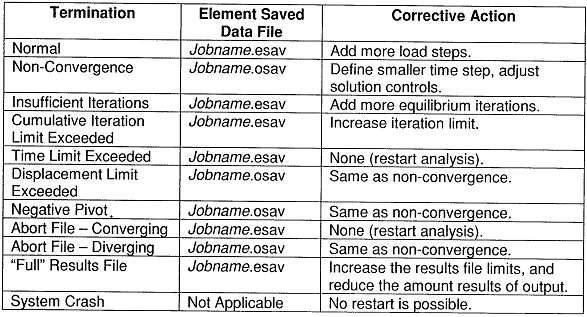
Presented below are the element saved data file
requirements for a restart. Note if jobname.osav is required, it must
be copied to jobname.esav before restarting the analysis.